Sunday, January 28, 2007
findref
findref is one of the program I use on daily basis. It a small opensource program (a single C source file written by Mr. Brian Wilson) that can be complied with any decent C compiler. It finds all references to a string in a C/C++ files in current directory and its subdirectory.
e.g.
I then use vim + line_number somefile.cpp to start editing the file.
Its also useful to find out how a variable is used in a project.
You can use grep along with find command, but findref is lot more convenient.
Next time I will write about how to use GNU ID utils, GLOBAL, Source Navigator and CSCOPE as C source tag system.
e.g.
Where -i is ignore case. It has many other options like not to span some directory.
c:\wx\samples>findref -i wxarraystring
.\console\console.cpp(259):         wxArrayString args = wxCmdLineParser::ConvertStringToArgs(cmdline);
.\console\console.cpp(399):     wxArrayString files;
.\console\console.cpp(587):     wxArrayString output;
.\console\console.cpp(835):     wxArrayString dirs = fn.GetDirs();
.\console\console.cpp(1672):     wxArrayString mimetypes;
.\console\console.cpp(1678):     wxArrayString exts;
.\console\console.cpp(3206):     wxArrayString files;
.\console\console.cpp(3349):             wxArrayString files;
.\console\console.cpp(3815):     wxArrayString volumes = wxFSVolume::GetVolumes();
.\console\console.cpp(5622): static void PrintArray(const wxChar* name, const wxArrayString& array)
.\console\console.cpp(6260):         wxArrayString a1;
.\console\console.cpp(6272):         wxArrayString a2(a1);
.\dialogs\dialogs.cpp(516):         wxArrayString paths, filenames;
.\dialup\nettest.cpp(305):     wxArrayString names;
.\dnd\dnd.cpp(87):                              const wxArrayString& filenames);
.\dnd\dnd.cpp(1372):     wxArrayString filenames;
.\dnd\dnd.cpp(1481): bool DnDFile::OnDropFiles(wxCoord, wxCoord, const wxArrayString& filenames)
.\exec\exec.cpp(124):                     const wxArrayString& output,
.\exec\exec.cpp(684):         wxArrayString output, errors;
.\exec\exec.cpp(927):                          const wxArrayString& output,
.\font\font.cpp(345):     const wxArrayString& GetFacenames() const
.\font\font.cpp(356):         wxArrayString m_facenames;
.\listbox\lboxtest.cpp(524):     wxArrayString items;
.\listbox\lboxtest.cpp(635):     wxArrayString items;
.\mobile\wxedit\wxedit.h(60):     wxArrayString   m_history;
.\widgets\combobox.cpp(334):     wxArrayString items;
.\widgets\listbox.cpp(345):     wxArrayString items;
.\widgets\listbox.cpp(454):     wxArrayString items;
.\widgets\widgets.cpp(291):     wxArrayString labels;
I then use vim + line_number somefile.cpp to start editing the file.
Its also useful to find out how a variable is used in a project.
You can use grep along with find command, but findref is lot more convenient.
Next time I will write about how to use GNU ID utils, GLOBAL, Source Navigator and CSCOPE as C source tag system.
Labels: debug


Friday, January 26, 2007
What was the last change I made?
You made a change in the source code, now there is some problem. Things are not working the same as before. Sounds familiar, you ask What was the last change I made? There are different tools designed just for that. The mother of all is the venerable diff command, a unix command line utility. The diff command can be used with another command line utility patch to bring the old version of source code to the current revision.
On MS Windows I use Winmerge. Winmerge is an Open Source visual file differencing (diff) and merging tool(patch) . It only works on windows platform.

diff can be used with binary files, which is a useful feature if you are an embedded developer.
On MS Windows I use Winmerge. Winmerge is an Open Source visual file differencing (diff) and merging tool(patch) . It only works on windows platform.

diff can be used with binary files, which is a useful feature if you are an embedded developer.
Labels: debug
Monday, November 20, 2006
A mysterious case of an Hard Drive stopping.
I built an external hard drive based on the FireWire/USB enclosure form CompUSA.

After powering on the hard drive, it use to crash after few minutes. The case used to get too hot to touch. I removed the case and observed that, though the external skin of the case is aluminum the internal is plastic. There was no way to absorb the heat from the hard drive and dissipate, the hard drive used to get too hot and stop. I used aluminum foil to couple the hard drive to external aluminum skin as shown in the photo.

I smeared heat sink compound over the aluminum foil which will now absorb
the heat away from the hard drive.

I have used this external drive from past 2 years without any problem

After powering on the hard drive, it use to crash after few minutes. The case used to get too hot to touch. I removed the case and observed that, though the external skin of the case is aluminum the internal is plastic. There was no way to absorb the heat from the hard drive and dissipate, the hard drive used to get too hot and stop. I used aluminum foil to couple the hard drive to external aluminum skin as shown in the photo.
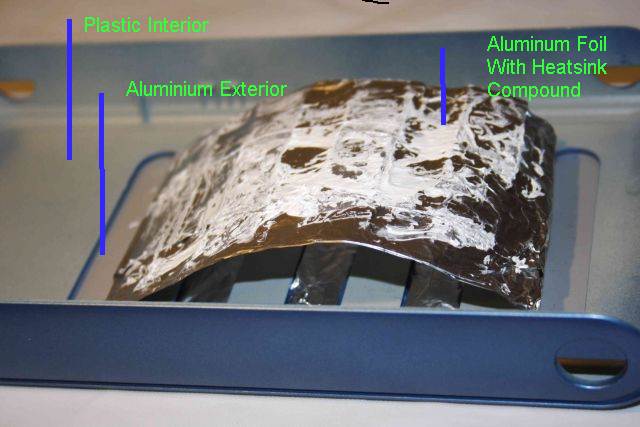
I smeared heat sink compound over the aluminum foil which will now absorb
the heat away from the hard drive.

I have used this external drive from past 2 years without any problem
Labels: debug
